SQL Overview
SQL (Structured Query Language) is the standard language used to define, query, and manage data in relational database management systems (RDBMSs). It is grounded in relational algebra and tuple relational calculus, giving SQL a precise mathematical meaning.
In practice, SQL powers everything from small embedded apps (e.g., SQLite) to large-scale enterprise and cloud data platforms (e.g., PostgreSQL, MySQL/MariaDB, SQL Server, Oracle, and cloud-native systems).
SQL is the common interface between applications and persistent relational data. Once you master the core of SQL, you can transfer skills across most database systems.
SQL is a declarative language: you specify what result you want, and the DBMS decides how to compute it efficiently. This design is crucial because the DBMS can change execution strategies automatically as data sizes, indexes, and statistics change.
- You describe the desired result set.
- The DBMS chooses access paths (index scan vs sequential scan).
- The DBMS chooses join order and join algorithms (nested-loop, hash join, sort-merge).
- The DBMS may use parallelism for speedups on multi-core systems.
-
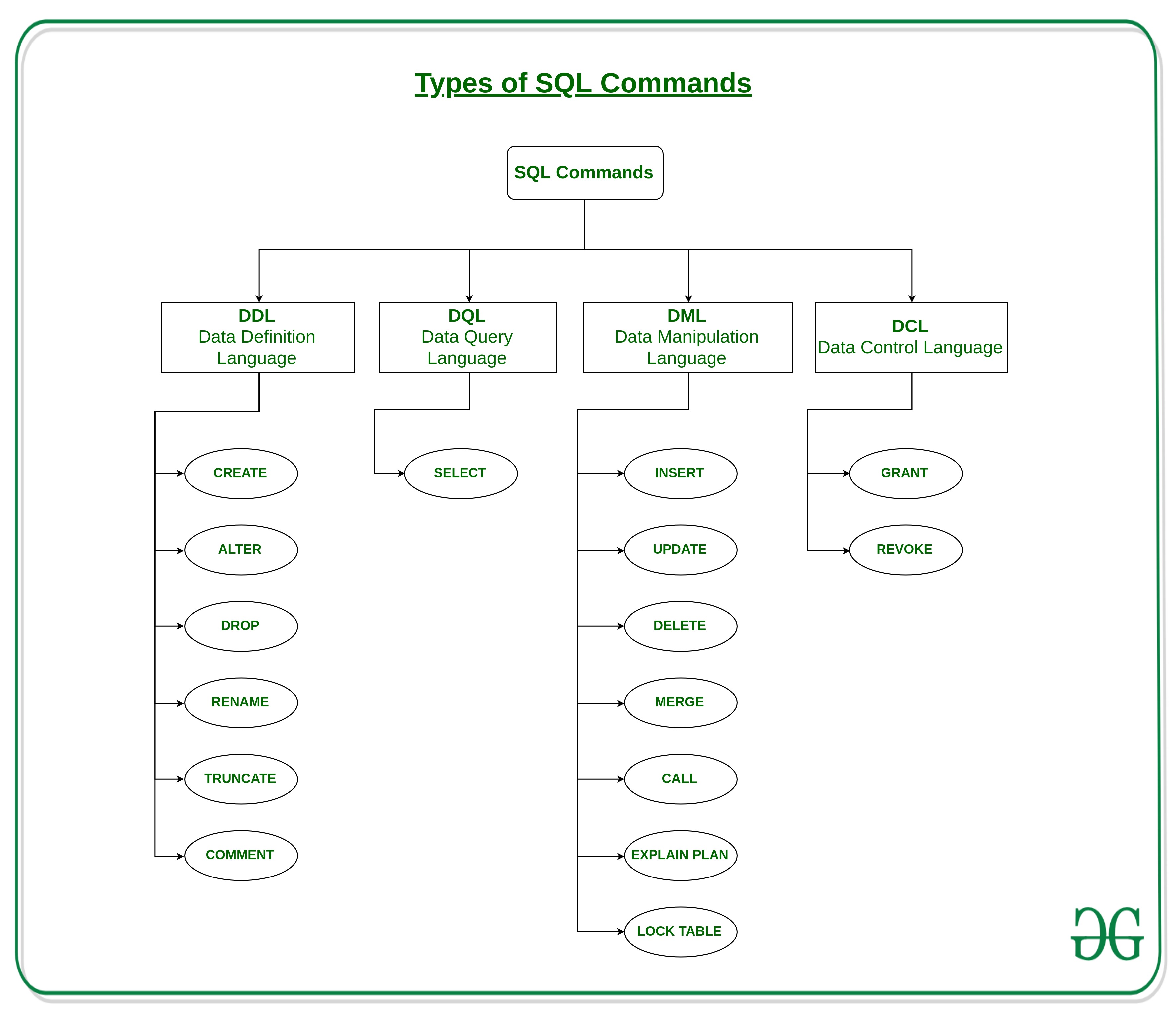
DDL (Data Definition Language) — define structure:
CREATE,ALTER,DROP,CREATE INDEX -
DML (Data Manipulation Language) — query & modify data:
SELECT,INSERT,UPDATE,DELETE,MERGE -
TCL (Transaction Control Language) — transaction boundaries:
COMMIT,ROLLBACK,SAVEPOINT -
DCL (Data Control Language) — permissions:
GRANT,REVOKE
SELECT is treated as part of DML.
-
1970Codd introduces the relational model (foundation of relational databases).
-
1970sIBM System R prototypes early SQL-style querying (historically influenced by SEQUEL).
-
1986–1987SQL becomes an ANSI standard and is adopted by ISO.
-
1992SQL-92 expands joins, constraints, and core relational features.
-
1999+Recursive queries, triggers, advanced constraints, and analytics capabilities emerge.
-
2016SQL:2016 strengthens SQL/JSON support for semi-structured data.
-
2023SQL:2023 is published, adding more JSON capabilities and a new standard component for SQL Property Graph Queries (SQL/PGQ).
-
TodaySQL remains central for OLTP, analytics, and pipelines—now spanning relational tables, JSON documents, and graph-style querying (DBMS support varies by vendor).
- Analytics: window functions, CTEs, recursive queries.
- Semi-structured: JSON types + JSON path/query functions (vendor-dependent).
- Scale: partitioning, parallel execution, columnar storage/engines in some systems.
- Beyond relational: graph querying is entering the standard (SQL/PGQ), but adoption is uneven.
Although SQL is standardized (ISO/IEC 9075), no DBMS implements the entire standard. Instead, systems share a large common core and differ in optional features and extensions.
- PostgreSQL: strong standards compliance; powerful extensions; excellent JSON support.
- MySQL / MariaDB: widely used in web stacks; feature sets differ by version and engine.
- SQL Server: rich tooling; strong analytics and enterprise integration.
- Oracle: enterprise features; extensive optimizer and scalability support.
- SQLite: lightweight embedded DB; great for mobile and local applications.
Master core SQL first (tables, keys, joins, grouping, constraints, transactions). Then learn vendor-specific details (JSON syntax, pagination, MERGE variants, date/time functions) when needed for a particular platform.
SQL provides a rich set of data types to represent numbers, text, dates/times, logical values, and binary objects. While the SQL standard defines broad categories, exact support and naming may vary across database vendors.
Numeric data types
| Category | Standard examples | Description | Example values |
|---|---|---|---|
| Integer | INTEGER, SMALLINT, BIGINT | Exact whole numbers | -3, 0, 42 |
| Exact decimal | DECIMAL(p,s), NUMERIC(p,s) | Exact fixed-point numbers (recommended for money) | 10.75, -0.01 |
| Approximate | REAL, FLOAT, DOUBLE PRECISION | Floating-point numbers (rounding may occur) | 3.14, -0.0001 |
Character and binary data types
| Category | Standard examples | Description | Example values |
|---|---|---|---|
| Fixed-length text | CHAR(n) | Strings padded to fixed length | 'CSCI' |
| Variable-length text | VARCHAR(n) | Most commonly used string type | 'Database' |
| Large text | TEXT, CLOB | Long-form text documents | 'Lorem ipsum…' |
| Fixed-length binary | BINARY(n) | Binary bytes with fixed size | 0xAF12 |
| Variable-length binary | VARBINARY(n), BLOB | Images, audio, files | (binary data) |
Date and time data types
| Standard type | Description | Example values |
|---|---|---|
| DATE | Calendar date (year, month, day) | 2025-03-10 |
| TIME | Time of day (no date) | 14:30:00 |
| TIMESTAMP | Date and time (optionally with time zone) | 2025-03-10 14:30:00 |
TIMESTAMP is not a Unix integer by definition.
It is a structured date–time type in SQL.
Some systems allow conversion to/from Unix epoch seconds, but that is vendor-specific.
Boolean and special-purpose types
| Type | Description | Notes |
|---|---|---|
| BOOLEAN | Logical true/false values | Some systems emulate using integers |
| ENUM | Predefined set of values | Common in MySQL; not part of core SQL standard |
| SET | Multiple selected values | Vendor-specific (e.g., MySQL) |
| JSON | Semi-structured JSON documents | Standardized in SQL:2016+ |
Not all SQL data types are supported uniformly across database vendors. Names, limits, and behavior may differ.
The data types listed here are the most commonly used. Real systems often provide additional vendor-specific types (e.g.,
MONEYin SQL Server, spatial types, UUIDs).Each DBMS enforces its own maximum size limits for strings, binary objects, and numeric precision. Always consult vendor documentation when designing schemas.
Give two reasons why the same SQL query might behave differently across different database management systems.
Show hint
Consider differences in SQL standard support, vendor extensions, and internal query optimization strategies.
Show answer
The behavior can differ because:
- DBMSs support different subsets of the SQL standard and provide vendor-specific extensions (e.g., JSON functions, date/time handling).
- Query optimizers use different cost models, statistics, and default settings (e.g., transaction isolation levels).
MySQL Overview
MySQL is a widely used relational database management system (RDBMS). It is open-source (community edition) with commercial offerings and support from Oracle.
- MySQL Server: the running DBMS process/service that accepts connections and executes SQL.
- Database (≈ schema in MySQL): a logical namespace/container that groups tables, views, etc.
- Table: a relation (rows/columns) stored inside a database.
Most SQL work happens in a client–server model: a client sends SQL; the server parses, optimizes, executes, and returns rows.
mysqlCLI- MySQL Workbench
- Python connector
- Java JDBC
- Web apps / APIs
- Parser & validator
- Query rewriter
- Optimizer
- Execution engine
- Storage engine (e.g., InnoDB)
This separation explains why credentials, network ports, and server status matter: your SQL is executed by the server, not your laptop.
Show a concrete example
When you run SELECT * FROM student; in a client, the SQL text is sent to the server.
The server reads data pages (via the storage engine), computes the result, and sends rows back to the client.
MySQL is architected with a SQL layer on top of storage engines. The default engine is InnoDB, which supports transactions (ACID), row-level locking, crash recovery, and foreign keys.
- Transactions (ACID)
- Row-level locking
- Foreign keys
- Crash recovery
- No transactions
- Table-level locking
- No foreign keys
- Use only for special legacy cases
For most modern applications and coursework, assume InnoDB unless explicitly stated otherwise.
- Core relational SQL: joins, grouping/aggregation, constraints, indexes.
-
Transactions (InnoDB):
COMMIT/ROLLBACK, isolation concepts. - Modern SQL features (MySQL 8+): common table expressions (CTEs) and window functions.
-
JSON support: MySQL supports a native
JSONtype (introduced in 5.7 and expanded in 8.x). - Security basics: authentication, privileges (GRANT/REVOKE), TLS support (configuration-dependent).
-
1995MySQL is created by MySQL AB.
-
2008MySQL AB is acquired by Sun Microsystems.
-
2010Oracle acquires Sun Microsystems (and MySQL).
-
2015MySQL 5.7 GA era (includes native JSON type).
-
2018MySQL 8.0 GA era (CTEs, window functions, many SQL enhancements).
-
2020HeatWave is introduced as an in-memory accelerator in Oracle’s MySQL cloud service.
-
2024+Oracle introduces a new model: LTS (e.g., MySQL 8.4 LTS) and Innovation releases (e.g., MySQL 9.0.x).
“LTS (Long-Term Support)” is what many production systems prefer (stable, long support). Innovation releases deliver new features faster. For this course, we focus on portable SQL concepts; version details matter mainly for feature availability.
In MySQL terminology, what is the difference between a server, a database (schema),
and a table?
Show hint
Think: process/service, namespace/container, and relation (rows/columns).
Show answer
The server is the running DBMS service. A database (schema) is a logical container/namespace inside the server. A table is a relation (rows/columns) stored within a database.
Name two features you get from using the InnoDB storage engine that you would not reliably get from a non-transactional engine.
Show hint
Think about transactions, locking granularity, crash recovery, and foreign keys.
Show answer
Examples: (1) ACID transactions (COMMIT/ROLLBACK), (2) row-level locking for better concurrency,
(3) crash recovery, (4) foreign key enforcement.
You are deploying a campus application that must be stable for years. Would you prefer an LTS release line or an Innovation release line? Explain your choice in 2–3 sentences.
Show hint
Think about stability/support windows vs new features delivered faster.
Show answer
Prefer LTS for long-lived stable deployments because it emphasizes stability and longer support. Innovation releases are better when you need new features quickly and can tolerate faster change.
Numeric
| Type | Description | Notes / Example |
|---|---|---|
| TINYINT / SMALLINT / INT / BIGINT | Exact integers | Use UNSIGNED if values are never negative |
| DECIMAL(p,s) | Exact fixed-point | Best for currency: DECIMAL(10,2) |
| FLOAT / DOUBLE | Approximate floating point | Fast but can round; avoid for money |
| BIT(n) | Bit-field | Flags/bitmasks; n up to 64 |
| BOOLEAN | Logical values | In MySQL, BOOLEAN is a synonym for TINYINT(1) |
String & Binary
| Type | Description | Notes / Example |
|---|---|---|
| CHAR(n) | Fixed-length string | Good for fixed codes (e.g., state abbreviations) |
| VARCHAR(n) | Variable-length string | Most common general-purpose string |
| TEXT / MEDIUMTEXT / LONGTEXT | Large text | Pick size based on expected max length |
| BINARY(n) / VARBINARY(n) | Binary bytes | Binary identifiers, hashed values |
| BLOB family | Binary large objects | Files, images, audio (often better stored externally + keep URLs) |
| ENUM / SET | Enumerated values | Convenient but less portable across DBMSs |
Date & Time
| Type | Description | Correct example |
|---|---|---|
| DATE | Date only | '2025-12-12' |
| TIME | Time only | '14:30:00' |
| DATETIME | Date + time (no timezone) | '2025-12-12 14:30:00' |
| TIMESTAMP | Date + time with timezone/UTC semantics | '2025-12-12 14:30:00' |
| YEAR | Year | 2025 |
Other
| Type | Description | Notes |
|---|---|---|
| JSON | JSON documents | Useful for semi-structured data; indexing/querying differs from relational design |
| GEOMETRY | Spatial data | Points/lines/polygons; requires spatial indexes for performance |
Installing and Starting MySQL
In this course, you will typically run a MySQL Server on your machine (or a VM) and connect to it
using a client such as the mysql command-line tool or MySQL Workbench.
The most common setup issues are simply: the server is not running, or the connection parameters are incorrect.
- Confirm server is running: service status / Task Manager /
brew services. - Know your connection parameters: host, port (default
3306), username, password. - Pick a GUI: Workbench or a lightweight SQL client.
- Create a sandbox database for practice.
- Use InnoDB (transactional, FK constraints).
MySQL on Windows 10
Install MySQL 8.0 Server and MySQL Workbench.
MySQL on Ubuntu 22.04
Install and configure MySQL Server on Ubuntu Linux.
MySQL on macOS
Install MySQL Community Server using the macOS installer.
Refer to the official website for details. The following steps are only for the installation of MySQL on macOS.
Step 1: Download MySQL Server (Community Edition) for macOS.
Step 2:
Click the downloaded .dmg file to open the MySQL Server installer package.
During the installation, it will display a “Configure MySQL Server” dialog;
set the root user password and click Finish to complete the installation.
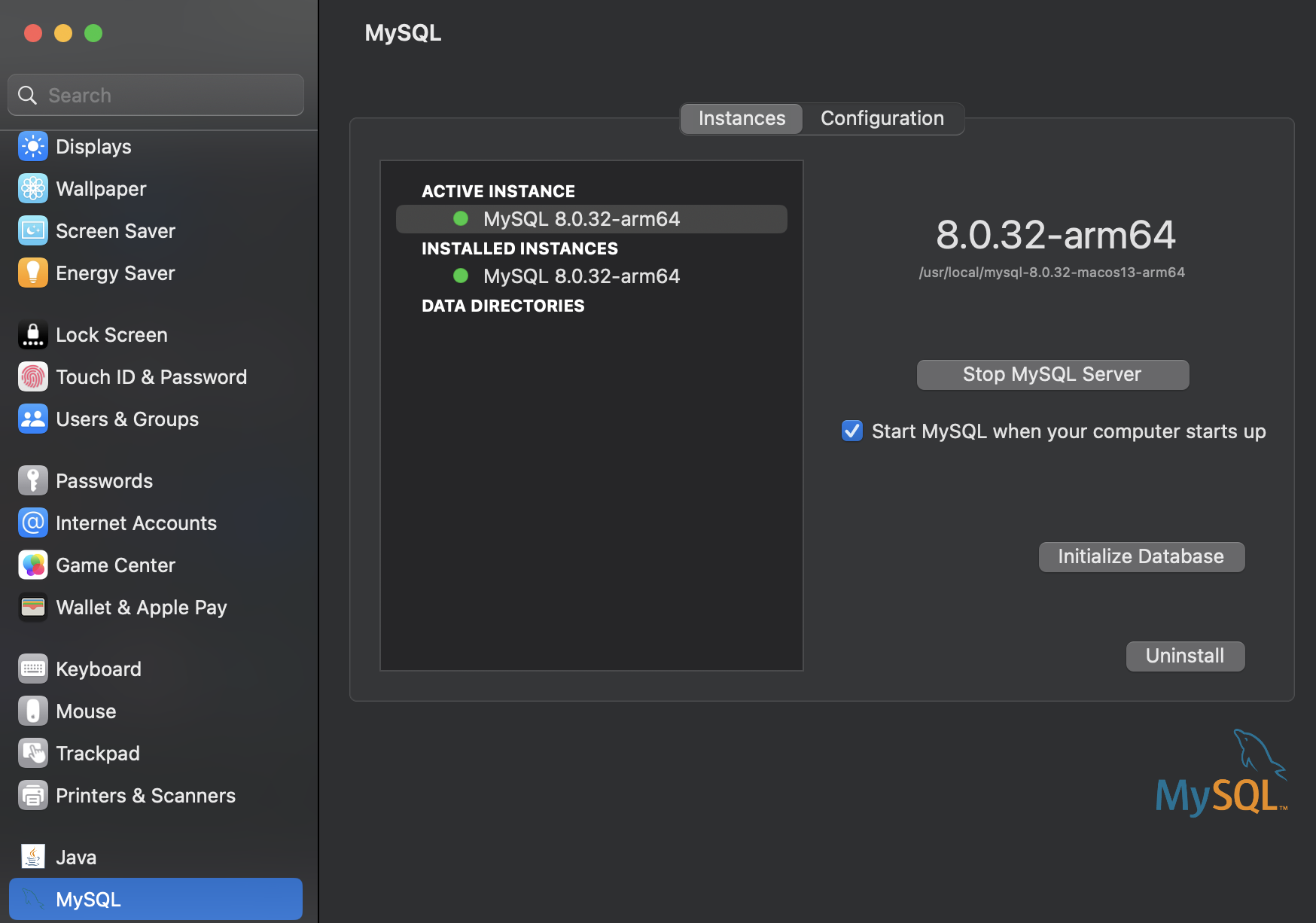
Step 3: Enable the launched service: open macOS System Preferences, select the MySQL preference panel, and click Start MySQL Server.
Step 4:
Connect to the MySQL server by running mysql -u root -p.
You can disconnect by entering exit.
Note that the MySQL server is still running in the background.
(base) wtong@wt-m2 ~ % mysql -u root -p
Enter password:
Welcome to the MySQL monitor.  Commands end with ; or \g.
Your MySQL connection id is 8
Server version: 8.0.32 MySQL Community Server - GPL

Copyright (c) 2000, 2023, Oracle and/or its affiliates.

Oracle is a registered trademark of Oracle Corporation and/or its
affiliates. Other names may be trademarks of their respective
owners.

Type 'help;' or '\h' for help. Type '\c' to clear the current input statement.

mysql> EXIT
Bye
(base) wtong@wt-m2 ~ %
You run mysql -u root -p and get Access denied for user.
List three likely causes and fixes.
Show hint
Credentials, host restrictions, and server status are the big three.
Show answer
- Wrong password → reset / verify credentials.
- Wrong user/host mapping → try
-h localhostor create user with correct host. - Server not running / wrong port → start MySQL service or specify correct port.
Common problem 1: How to fix “mysql command not found”
Common problem 2: If you forget the root password, you can use the following steps on macOS.
-
Make sure you have stopped MySQL first.
Go to: 'System Preferences' >> 'MySQL' and stop MySQL
OR,sudo /usr/local/mysql/support-files/mysql.server start sudo /usr/local/mysql/support-files/mysql.server stop sudo /usr/local/mysql/support-files/mysql.server status
-
Run the server in safe mode with privilege bypass:
sudo mysqld_safe --skip-grant-tables -
In a new window connect to the database, set a new password, flush permissions, and quit:
mysql -u root
UPDATE mysql.user SET authentication_string=null WHERE User='root';
FLUSH PRIVILEGES;
exit;
Then:mysql -u root ALTER USER 'root'@'localhost' IDENTIFIED WITH caching_sha2_password BY 'yourpasswd';
Play with MySQL Commands
This subsection is a hands-on “muscle memory” guide for the mysql command-line client.
You will practice connecting, creating databases/tables, loading data, and running basic queries.
Note: examples may display an older version string; your installed version may differ. As of 2025, MySQL has both an LTS track (e.g., 8.4.x) and an Innovation track (9.x).
Cheat Sheet: Practice Questions:
Think “client → server”. The mysql program is a client; mysqld is the server daemon.
You must know host, port (default 3306), username, and password.
(base) wtong@wt-m2 ~ % mysql -h host -u user -p
Enter password: *******
host and user represent the host name where your MySQL server is running and the user name
of your MySQL account. If you are logging in on the same machine that MySQL is running on, you can omit the host:
(base) wtong@wt-m2 ~ % mysql -u root -p
Enter password:
Welcome to the MySQL monitor.  Commands end with ; or \g.
Your MySQL connection id is 8
Server version: 8.0.32 MySQL Community Server - GPL

Copyright (c) 2000, 2023, Oracle and/or its affiliates.

Oracle is a registered trademark of Oracle Corporation and/or its
affiliates. Other names may be trademarks of their respective
owners.

Type 'help;' or '\h' for help. Type '\c' to clear the current input statement.

mysql> QUIT
Bye
(base) wtong@wt-m2 ~ %
Show tip: useful mysql client commands
\s— status summary (server, user, database, charset).\u dbname— switch database (same asUSE dbname).\G— show result vertically (great for wide rows).\c— cancel current input.EXIT/QUIT— leave the client (server keeps running).
mysql> SELECT VERSION(), CURRENT_DATE;
+-----------+--------------+
| VERSION() | CURRENT_DATE |
+-----------+--------------+
| 8.0.32    | 2023-09-07   |
+-----------+--------------+
1 row in set (0.00 sec)

mysql>
-
A query normally consists of an SQL statement followed by a semicolon. (There are exceptions where a semicolon may be omitted.
QUITis one of them.) -
When you issue a query, mysql sends it to the server for execution and displays the results, then prints another
mysql>prompt. -
Output is shown in tabular form (rows and columns). Column labels usually come from selected columns (or the expression text if you selected an expression).
-
The client shows the number of returned rows and the elapsed time. This is wall-clock time and depends on load and latency.
Keywords may be entered in any letter case. The following are equivalent:
mysql> SELECT VERSION(), CURRENT_DATE;
mysql> select version(), current_date;
mysql> SeLeCt vErSiOn(), current_DATE;
mysql> SHOW DATABASES;
+--------------------+
| Database           |
+--------------------+
| information_schema |
| mysql              |
| performance_schema |
| sys                |
| test               |
| WT                 |
+--------------------+
6 rows in set (0.00 sec)
mysql> CREATE DATABASE helloworld;
Query OK, 1 row affected (0.00 sec)

mysql> SHOW DATABASES
    -> ;
+--------------------+
| Database           |
+--------------------+
| helloworld         |
| information_schema |
| mysql              |
| performance_schema |
| sys                |
| test               |
| WT                 |
+--------------------+
7 rows in set (0.00 sec)
mysql> DROP DATABASE helloworld;
Query OK, 0 rows affected (0.02 sec)

mysql> SHOW DATABASES;
+--------------------+
| Database           |
+--------------------+
| information_schema |
| mysql              |
| performance_schema |
| sys                |
| test               |
| WT                 |
+--------------------+
6 rows in set (0.01 sec)
Show tip: safe deletion
In real systems, avoid dropping databases casually. Prefer backups, snapshots, and least-privilege accounts.
mysql> CREATE DATABASE helloworld;
Query OK, 1 row affected (0.00 sec)

mysql> USE helloworld
Database changed
mysql> SHOW TABLES;
Empty set (0.00 sec)

/* USE, like QUIT, does not require a semicolon.
   (You can terminate such statements with a semicolon if you like; it does no harm.)
*/
mysql> CREATE TABLE pet (name VARCHAR(20), owner VARCHAR(20),
    ->        species VARCHAR(20), sex CHAR(1), birth DATE, death DATE);
Query OK, 0 rows affected (0.01 sec)

mysql> SHOW TABLES;
+----------------------+
| Tables_in_helloworld |
+----------------------+
| pet                  |
+----------------------+
1 row in set (0.00 sec)

mysql> DESCRIBE pet;
+---------+-------------+------+-----+---------+-------+
| Field   | Type        | Null | Key | Default | Extra |
+---------+-------------+------+-----+---------+-------+
| name    | varchar(20) | YES  |     | NULL    |       |
| owner   | varchar(20) | YES  |     | NULL    |       |
| species | varchar(20) | YES  |     | NULL    |       |
| sex     | char(1)     | YES  |     | NULL    |       |
| birth   | date        | YES  |     | NULL    |       |
| death   | date        | YES  |     | NULL    |       |
+---------+-------------+------+-----+---------+-------+
6 rows in set (0.00 sec)
Show note: why InnoDB matters
In modern MySQL, InnoDB is the default and recommended storage engine: it supports transactions, crash recovery, and foreign keys (when used correctly).
To follow the examples exactly, you can download the sample data file here:
pet.txt (save it locally and update the path in LOAD DATA LOCAL INFILE if needed).
mysql> SHOW VARIABLES LIKE 'local_infile';
+---------------+-------+
| Variable_name | Value |
+---------------+-------+
| local_infile  | OFF   |
+---------------+-------+
1 row in set (0.00 sec)

mysql> SET GLOBAL local_infile = 1;
Query OK, 0 rows affected (0.00 sec)

mysql> EXIT;
The command SET GLOBAL local_infile = 1; enables the server to accept
LOAD DATA LOCAL INFILE statements. This is often disabled by default for security reasons.
SET GLOBAL: Changes the global server setting (usually requires admin privilege). It may revert after restart unless configured in the server configuration.local_infile: Controls server-side acceptance of local file loading.= 1: Enables it (server side). Some clients also require enabling it explicitly.
Show important security note (recommended reading)
LOAD DATA LOCAL INFILE can be abused when combined with SQL injection or misconfigured clients.
Only enable it when needed, and prefer enabling it per-session/client invocation when possible.
Reconnect to MySQL with local infile enabled on the client side:
% mysql --local-infile=1 -u root -p
mysql> LOAD DATA LOCAL INFILE '/Users/wtong/Desktop/pet.txt' INTO TABLE pet;
Query OK, 1 row affected (0.01 sec)
Records: 1  Deleted: 0  Skipped: 0  Warnings: 0

mysql> SELECT * FROM pet;
+----------+-------+---------+------+------------+-------+
| name     | owner | species | sex  | birth      | death |
+----------+-------+---------+------+------------+-------+
| Whistler | Gwen  | bird    | NULL | 1997-12-09 | NULL  |
+----------+-------+---------+------+------------+-------+
1 row in set (0.01 sec)

mysql> INSERT INTO pet
    ->        VALUES ('Puffball','Diane','hamster','f','1999-03-30',NULL);
Query OK, 1 row affected (0.00 sec)

mysql> SELECT * FROM pet;
+----------+-------+---------+------+------------+-------+
| name     | owner | species | sex  | birth      | death |
+----------+-------+---------+------+------------+-------+
| Whistler | Gwen  | bird    | NULL | 1997-12-09 | NULL  |
| Puffball | Diane | hamster | f    | 1999-03-30 | NULL  |
+----------+-------+---------+------+------------+-------+
2 rows in set (0.00 sec)

mysql> DELETE FROM pet;
Query OK, 2 rows affected (0.00 sec)

mysql> SELECT * FROM pet;
Empty set (0.00 sec)
SELECT what_to_select
FROM which_table
WHERE conditions_to_satisfy;
mysql> SELECT * FROM pet;
+----------+--------+---------+------+------------+------------+
| name     | owner  | species | sex  | birth      | death      |
+----------+--------+---------+------+------------+------------+
| Fluffy   | Harold | cat     | f    | 1993-02-04 | NULL       |
| Claws    | Gwen   | cat     | m    | 1994-03-17 | NULL       |
| Buffy    | Harold | dog     | f    | 1989-05-13 | NULL       |
| Fang     | Benny  | dog     | m    | 1990-08-27 | NULL       |
| Bowser   | Diane  | dog     | m    | 1979-08-31 | 1995-07-29 |
| Chirpy   | Gwen   | bird    | f    | 1998-09-11 | 0000-00-00 |
| Whistler | Gwen   | bird    | NULL | 1997-12-09 | 0000-00-00 |
| Slim     | Benny  | snake   | m    | 1996-04-29 | NULL       |
| Puffball | Diane  | hamster | f    | 1999-03-30 | NULL       |
+----------+--------+---------+------+------------+------------+
9 rows in set (0.00 sec)

mysql> UPDATE pet SET birth = '1989-08-31' WHERE name = 'Bowser';
Query OK, 1 row affected (0.00 sec)
Rows matched: 1  Changed: 1  Warnings: 0

mysql> SELECT * FROM pet WHERE name = 'Bowser';
+--------+-------+---------+------+------------+------------+
| name   | owner | species | sex  | birth      | death      |
+--------+-------+---------+------+------------+------------+
| Bowser | Diane | dog     | m    | 1989-08-31 | 1995-07-29 |
+--------+-------+---------+------+------------+------------+
1 row in set (0.00 sec)
mysql> SELECT * FROM pet WHERE birth >= '1998-1-1';
+----------+-------+---------+------+------------+------------+
| name     | owner | species | sex  | birth      | death      |
+----------+-------+---------+------+------------+------------+
| Chirpy   | Gwen  | bird    | f    | 1998-09-11 | 0000-00-00 |
| Puffball | Diane | hamster | f    | 1999-03-30 | NULL       |
+----------+-------+---------+------+------------+------------+
2 rows in set (0.00 sec)


mysql> SELECT * FROM pet WHERE species = 'dog' AND sex = 'f';
+-------+--------+---------+------+------------+-------+
| name  | owner  | species | sex  | birth      | death |
+-------+--------+---------+------+------------+-------+
| Buffy | Harold | dog     | f    | 1989-05-13 | NULL  |
+-------+--------+---------+------+------------+-------+


mysql> SELECT * FROM pet WHERE species = 'snake' OR species = 'bird';
+----------+-------+---------+------+------------+-------+
| name     | owner | species | sex  | birth      | death |
+----------+-------+---------+------+------------+-------+
| Chirpy   | Gwen  | bird    | f    | 1998-09-11 | NULL  |
| Whistler | Gwen  | bird    | NULL | 1997-12-09 | NULL  |
| Slim     | Benny | snake   | m    | 1996-04-29 | NULL  |
+----------+-------+---------+------+------------+-------+


mysql> SELECT * FROM pet WHERE (species = 'cat' AND sex = 'm')
       OR (species = 'dog' AND sex = 'f');
+-------+--------+---------+------+------------+-------+
| name  | owner  | species | sex  | birth      | death |
+-------+--------+---------+------+------------+-------+
| Claws | Gwen   | cat     | m    | 1994-03-17 | NULL  |
| Buffy | Harold | dog     | f    | 1989-05-13 | NULL  |
+-------+--------+---------+------+------------+-------+


mysql> SELECT name, birth FROM pet;
+----------+------------+
| name     | birth      |
+----------+------------+
| Fluffy   | 1993-02-04 |
| Claws    | 1994-03-17 |
| Buffy    | 1989-05-13 |
| Fang     | 1990-08-27 |
| Bowser   | 1989-08-31 |
| Chirpy   | 1998-09-11 |
| Whistler | 1997-12-09 |
| Slim     | 1996-04-29 |
| Puffball | 1999-03-30 |
+----------+------------+


mysql> SELECT DISTINCT owner FROM pet;
+--------+
| owner  |
+--------+
| Benny  |
| Diane  |
| Gwen   |
| Harold |
+--------+


mysql> SELECT name, birth FROM pet ORDER BY birth;
+----------+------------+
| name     | birth      |
+----------+------------+
| Buffy    | 1989-05-13 |
| Bowser   | 1989-08-31 |
| Fang     | 1990-08-27 |
| Fluffy   | 1993-02-04 |
| Claws    | 1994-03-17 |
| Slim     | 1996-04-29 |
| Whistler | 1997-12-09 |
| Chirpy   | 1998-09-11 |
| Puffball | 1999-03-30 |
+----------+------------+


mysql> SELECT name, birth FROM pet ORDER BY birth DESC;
+----------+------------+
| name     | birth      |
+----------+------------+
| Puffball | 1999-03-30 |
| Chirpy   | 1998-09-11 |
| Whistler | 1997-12-09 |
| Slim     | 1996-04-29 |
| Claws    | 1994-03-17 |
| Fluffy   | 1993-02-04 |
| Fang     | 1990-08-27 |
| Bowser   | 1989-08-31 |
| Buffy    | 1989-05-13 |
+----------+------------+


mysql> SELECT name, species, birth FROM pet
       ORDER BY species, birth DESC;
+----------+---------+------------+
| name     | species | birth      |
+----------+---------+------------+
| Chirpy   | bird    | 1998-09-11 |
| Whistler | bird    | 1997-12-09 |
| Claws    | cat     | 1994-03-17 |
| Fluffy   | cat     | 1993-02-04 |
| Fang     | dog     | 1990-08-27 |
| Bowser   | dog     | 1989-08-31 |
| Buffy    | dog     | 1989-05-13 |
| Puffball | hamster | 1999-03-30 |
| Slim     | snake   | 1996-04-29 |
+----------+---------+------------+


/* To determine how many years old each of your pets is, use the TIMESTAMPDIFF() function. */
mysql> SELECT name, birth, CURDATE(),
       TIMESTAMPDIFF(YEAR,birth,CURDATE()) AS age
       FROM pet;
+----------+------------+------------+------+
| name     | birth      | CURDATE()  | age  |
+----------+------------+------------+------+
| Fluffy   | 1993-02-04 | 2003-08-19 |   10 |
| Claws    | 1994-03-17 | 2003-08-19 |    9 |
| Buffy    | 1989-05-13 | 2003-08-19 |   14 |
| Fang     | 1990-08-27 | 2003-08-19 |   12 |
| Bowser   | 1989-08-31 | 2003-08-19 |   13 |
| Chirpy   | 1998-09-11 | 2003-08-19 |    4 |
| Whistler | 1997-12-09 | 2003-08-19 |    5 |
| Slim     | 1996-04-29 | 2003-08-19 |    7 |
| Puffball | 1999-03-30 | 2003-08-19 |    4 |
+----------+------------+------------+------+


mysql> SELECT name, birth, CURDATE(),
       TIMESTAMPDIFF(YEAR,birth,CURDATE()) AS age
       FROM pet ORDER BY age;
+----------+------------+------------+------+
| name     | birth      | CURDATE()  | age  |
+----------+------------+------------+------+
| Chirpy   | 1998-09-11 | 2003-08-19 |    4 |
| Puffball | 1999-03-30 | 2003-08-19 |    4 |
| Whistler | 1997-12-09 | 2003-08-19 |    5 |
| Slim     | 1996-04-29 | 2003-08-19 |    7 |
| Claws    | 1994-03-17 | 2003-08-19 |    9 |
| Fluffy   | 1993-02-04 | 2003-08-19 |   10 |
| Fang     | 1990-08-27 | 2003-08-19 |   12 |
| Bowser   | 1989-08-31 | 2003-08-19 |   13 |
| Buffy    | 1989-05-13 | 2003-08-19 |   14 |
+----------+------------+------------+------+

/* MySQL provides several functions for extracting parts of dates, such as YEAR(), MONTH(), and DAYOFMONTH(). */
mysql> SELECT name, birth, MONTH(birth) FROM pet;
+----------+------------+--------------+
| name     | birth      | MONTH(birth) |
+----------+------------+--------------+
| Fluffy   | 1993-02-04 |            2 |
| Claws    | 1994-03-17 |            3 |
| Buffy    | 1989-05-13 |            5 |
| Fang     | 1990-08-27 |            8 |
| Bowser   | 1989-08-31 |            8 |
| Chirpy   | 1998-09-11 |            9 |
| Whistler | 1997-12-09 |           12 |
| Slim     | 1996-04-29 |            4 |
| Puffball | 1999-03-30 |            3 |
+----------+------------+--------------+
/* To find names beginning with b:*/

mysql> SELECT * FROM pet WHERE name LIKE 'b%';
+--------+--------+---------+------+------------+------------+
| name   | owner  | species | sex  | birth      | death      |
+--------+--------+---------+------+------------+------------+
| Buffy  | Harold | dog     | f    | 1989-05-13 | NULL       |
| Bowser | Diane  | dog     | m    | 1989-08-31 | 1995-07-29 |
+--------+--------+---------+------+------------+------------+

/* To find names ending with fy: */
mysql> SELECT * FROM pet WHERE name LIKE '%fy';
+--------+--------+---------+------+------------+-------+
| name   | owner  | species | sex  | birth      | death |
+--------+--------+---------+------+------------+-------+
| Fluffy | Harold | cat     | f    | 1993-02-04 | NULL  |
| Buffy  | Harold | dog     | f    | 1989-05-13 | NULL  |
+--------+--------+---------+------+------------+-------+

/* To find names containing a w: */
mysql> SELECT * FROM pet WHERE name LIKE '%w%';
+----------+-------+---------+------+------------+------------+
| name     | owner | species | sex  | birth      | death      |
+----------+-------+---------+------+------------+------------+
| Claws    | Gwen  | cat     | m    | 1994-03-17 | NULL       |
| Bowser   | Diane | dog     | m    | 1989-08-31 | 1995-07-29 |
| Whistler | Gwen  | bird    | NULL | 1997-12-09 | NULL       |
+----------+-------+---------+------+------------+------------+

/* To find names containing exactly five characters, use five instances of the _ pattern character: */
mysql> SELECT * FROM pet WHERE name LIKE '_____';
+-------+--------+---------+------+------------+-------+
| name  | owner  | species | sex  | birth      | death |
+-------+--------+---------+------+------------+-------+
| Claws | Gwen   | cat     | m    | 1994-03-17 | NULL  |
| Buffy | Harold | dog     | f    | 1989-05-13 | NULL  |
+-------+--------+---------+------+------------+-------+

/* For more information about the syntax for regular expressions, see Regular Expressions.
   https://dev.mysql.com/doc/refman/8.0/en/regexp.html
*/
mysql> SELECT COUNT(*) FROM pet;
+----------+
| COUNT(*) |
+----------+
|        9 |
+----------+

mysql> SELECT owner, COUNT(*) FROM pet GROUP BY owner;
+--------+----------+
| owner  | COUNT(*) |
+--------+----------+
| Benny  |        2 |
| Diane  |        2 |
| Gwen   |        3 |
| Harold |        2 |
+--------+----------+

mysql> SELECT species, COUNT(*) FROM pet GROUP BY species;
+---------+----------+
| species | COUNT(*) |
+---------+----------+
| bird    |        2 |
| cat     |        2 |
| dog     |        3 |
| hamster |        1 |
| snake   |        1 |
+---------+----------+
Please follow the official examples: Retrieving Information from a Table .
Show note: “0000-00-00” dates
Some old sample datasets use 0000-00-00 as a “zero date”. In modern configurations,
MySQL may reject it depending on SQL mode (e.g., stricter date validation). Use real dates or NULL
when modeling “unknown”.
SQL Details
SQL statements are often grouped by what they control: structure (DDL), data (DML), permissions (DCL), and transactions (TCL).
DDL — Data Definition Language
Define / change database objects
CREATE,DROP,ALTERTRUNCATE,RENAME,COMMENT
DCL — Data Control Language
Privileges / access control
GRANT,REVOKECREATE USER,DROP USERin MySQL admin
TCL — Transaction Control Language
Commit / rollback changes
COMMIT,ROLLBACK,SAVEPOINTSTART TRANSACTION,SET TRANSACTION
Refer to
DDL defines or changes database objects (databases, tables, indexes, constraints).
Common DDL commands: CREATE, ALTER, DROP, TRUNCATE, RENAME.
- Note (MySQL 8.x):
CHECKconstraints are enforced in modern MySQL (older versions parsed but did not enforce them).
DDL changes schema objects (and often triggers implicit commits). Use with care on production databases.
MySQL supports three common comment styles:
#to end of line--(double-dash must be followed by whitespace) to end of line/* ... */C-style block comments (can span multiple lines)
mysql> SELECT 1+1;     # This comment continues to the end of line
mysql> SELECT 1+1;     -- This comment continues to the end of line
mysql> SELECT 1 /* this is an in-line comment */ + 1;
mysql> SELECT 1+
/*
this is a
multiple-line comment
*/
1;
In MySQL, CREATE SCHEMA is a synonym for CREATE DATABASE.
Use IF NOT EXISTS / IF EXISTS to make scripts repeatable.
/*
CREATE DATABASE databasename;

CREATE SCHEMA is a synonym for CREATE DATABASE
*/

CREATE DATABASE testDB;
CREATE SCHEMA StudentsInfo;

/* Re-runnable variants */
CREATE DATABASE IF NOT EXISTS testDB;
DROP DATABASE IF EXISTS testDB;
/*
DROP DATABASE databasename;
*/

DROP DATABASE testDB;
DROP SCHEMA StudentsInfo;
/*
CREATE TABLE table_name (
    column1 datatype,
    column2 datatype,
    column3 datatype,
    ....
);

CREATE TABLE new_table_name AS
  SELECT column1, column2, ...
  FROM existing_table_name
  WHERE ...;
*/

USE StudentsInfo;

CREATE TABLE Students (
  StudentID int,
  StudentName varchar(255),
  ParentName varchar(255),
  Address varchar(255),
  PostalCode int,
  City varchar(255)
);

CREATE TABLE TestTable AS
SELECT customername, contactname
FROM customers;
/*
DROP TABLE table_name;
*/

DROP TABLE Shippers;

/*
The TRUNCATE TABLE statement deletes all rows inside a table, but not the table itself.
(Usually faster than DELETE without WHERE; it also resets auto-increment counters in many cases.)
*/
TRUNCATE TABLE table_name;
Common gotcha
CREATE TABLE ... AS SELECT ... copies data and column definitions,
but does not automatically copy indexes/keys/foreign keys from the source table.
Use ALTER TABLE to add / modify / drop columns and constraints.
/* Add a column */
ALTER TABLE Students
ADD DateOfBirth date;

/* Drop a column */
ALTER TABLE Customers
DROP COLUMN Email;

/* Modify a column type */
ALTER TABLE Persons
MODIFY COLUMN DateOfBirth year;
Constraints can be specified when creating a table (CREATE TABLE) or later (ALTER TABLE).
Common constraints:
- NOT NULL — disallow
NULLvalues - UNIQUE — all values must be distinct
- PRIMARY KEY — unique + not null identifier (one per table, may be composite)
- FOREIGN KEY — enforce references across tables
- CHECK — enforce boolean condition on inserted/updated values (enforced in modern MySQL 8.x)
- DEFAULT — default value if none provided
- INDEX — speed up lookups and ordering
/*
General form:
CREATE TABLE table_name (
    column1 datatype constraint,
    column2 datatype constraint,
    column3 datatype constraint,
    ....
);
*/
NOT NULL examples
CREATE TABLE Persons (
  ID int NOT NULL,
  LastName varchar(255) NOT NULL,
  FirstName varchar(255) NOT NULL,
  Age int
);

ALTER TABLE Persons
MODIFY Age int NOT NULL;
UNIQUE examples
/*
UNIQUE ensures column values are distinct.
A PRIMARY KEY is also UNIQUE automatically.
You can have multiple UNIQUE constraints per table, but only one PRIMARY KEY.
*/

CREATE TABLE Persons (
  ID int NOT NULL,
  LastName varchar(255) NOT NULL,
  FirstName varchar(255),
  Age int,
  UNIQUE (ID)
);

ALTER TABLE Persons
ADD UNIQUE (ID);

/* Named UNIQUE constraint; can also be multi-column */
CREATE TABLE Persons (
  ID int NOT NULL,
  LastName varchar(255) NOT NULL,
  FirstName varchar(255),
  Age int,
  CONSTRAINT UC_Person UNIQUE (ID,LastName)
);

ALTER TABLE Persons
ADD CONSTRAINT UC_Person UNIQUE (ID,LastName);

/* Drop a UNIQUE constraint (implemented as an index in MySQL) */
ALTER TABLE Persons
DROP INDEX UC_Person;
PRIMARY KEY examples
/*
PRIMARY KEY uniquely identifies each record.
Must be UNIQUE and NOT NULL.
Can be single-column or composite.
*/

CREATE TABLE Persons (
  ID int NOT NULL,
  LastName varchar(255) NOT NULL,
  FirstName varchar(255),
  Age int,
  PRIMARY KEY (ID)
);

ALTER TABLE Persons
ADD PRIMARY KEY (ID);

/* Named composite primary key */
CREATE TABLE Persons (
  ID int NOT NULL,
  LastName varchar(255) NOT NULL,
  FirstName varchar(255),
  Age int,
  CONSTRAINT PK_Person PRIMARY KEY (ID,LastName)
);

ALTER TABLE Persons
ADD CONSTRAINT PK_Person PRIMARY KEY (ID,LastName);

/* Drop primary key */
ALTER TABLE Persons
DROP PRIMARY KEY;
FOREIGN KEY examples
Your original example referenced Persons(PersonID), but the table above defines Persons(ID).
Below is the corrected version (same idea, correct referenced column).
/*
FOREIGN KEY prevents actions that would destroy links between tables.
Child table contains the foreign key; parent table contains the referenced key.
*/

CREATE TABLE Orders (
  OrderID int NOT NULL,
  OrderNumber int NOT NULL,
  PersonID int,
  PRIMARY KEY (OrderID),
  FOREIGN KEY (PersonID) REFERENCES Persons(ID)
);

ALTER TABLE Orders
ADD FOREIGN KEY (PersonID) REFERENCES Persons(ID);

/* Named foreign key constraint */
CREATE TABLE Orders (
  OrderID int NOT NULL,
  OrderNumber int NOT NULL,
  PersonID int,
  PRIMARY KEY (OrderID),
  CONSTRAINT FK_PersonOrder FOREIGN KEY (PersonID)
    REFERENCES Persons(ID)
);

ALTER TABLE Orders
ADD CONSTRAINT FK_PersonOrder
FOREIGN KEY (PersonID) REFERENCES Persons(ID);

/* Drop foreign key constraint */
ALTER TABLE Orders
DROP FOREIGN KEY FK_PersonOrder;
CHECK examples
/*
CHECK limits the value range placed in a column (or row).
*/

CREATE TABLE Persons (
  ID int NOT NULL,
  LastName varchar(255) NOT NULL,
  FirstName varchar(255),
  Age int,
  CHECK (Age>=18)
);

ALTER TABLE Persons
ADD CHECK (Age>=18);

/* Named CHECK constraint; can include multiple predicates */
CREATE TABLE Persons (
  ID int NOT NULL,
  LastName varchar(255) NOT NULL,
  FirstName varchar(255),
  Age int,
  City varchar(255),
  CONSTRAINT CHK_Person CHECK (Age>=18 AND City='Sandnes')
);

ALTER TABLE Persons
ADD CONSTRAINT CHK_PersonAge CHECK (Age>=18 AND City='Sandnes');

/* Drop CHECK constraint */
ALTER TABLE Persons
DROP CHECK CHK_PersonAge;
DEFAULT examples
/*
DEFAULT sets a default value for a column if no value is specified.
*/

CREATE TABLE Persons (
  ID int NOT NULL,
  LastName varchar(255) NOT NULL,
  FirstName varchar(255),
  Age int,
  City varchar(255) DEFAULT 'Sandnes'
);

ALTER TABLE Persons
ALTER City SET DEFAULT 'Sandnes';

/* You can also use functions like CURRENT_DATE() */
CREATE TABLE Orders (
  ID int NOT NULL,
  OrderNumber int NOT NULL,
  OrderDate date DEFAULT CURRENT_DATE()
);

/* Drop a DEFAULT */
ALTER TABLE Persons
ALTER City DROP DEFAULT;
A database index improves query speed (especially for WHERE, JOIN, and ORDER BY).
Indexes are often implemented with B-trees (general-purpose) or hash structures (engine-dependent).
DESC)PRIMARY: primary keyUNIQUE: unique index/constraintMUL: non-unique index (multiple rows can share a value)
We can create indexes when creating a table or on an existing table:
/*
CREATE INDEX creates an index (duplicates allowed).
CREATE UNIQUE INDEX creates a unique index (duplicates disallowed).
DROP an index using ALTER TABLE ... DROP INDEX ...
*/

CREATE INDEX index_name
ON table_name (column1, column2, ...);

CREATE UNIQUE INDEX index_name
ON table_name (column1, column2, ...);

CREATE INDEX idx_lastname
ON Persons (LastName);

CREATE INDEX idx_pname
ON Persons (LastName, FirstName);

ALTER TABLE table_name
DROP INDEX index_name;
Example: create a new table CUSTOMERS and add an index on one column during creation:
CREATE TABLE CUSTOMERS (
  ID INT NOT NULL,
  NAME VARCHAR (20) NOT NULL,
  AGE INT NOT NULL,
  ADDRESS CHAR (25),
  SALARY DECIMAL (18, 2),
  INDEX(ID)
);

DESC CUSTOMERS;
The DESC output will show a MUL key on ID (indexed but not unique).
To create an index on an existing table:
- With
CREATE INDEX - With
ALTER TABLE ... ADD INDEX
CREATE INDEX NAME_INDEX ON CUSTOMERS (Name);
DESC CUSTOMERS;

ALTER TABLE CUSTOMERS ADD INDEX AGE_INDEX (AGE);
DESC CUSTOMERS;
AUTO_INCREMENT generates a unique number automatically for new rows
(commonly used for a primary key).
/*
AUTO_INCREMENT generates IDs automatically.
Default start is 1 and increments by 1 (unless configured otherwise).
*/

CREATE TABLE Persons (
  Personid int NOT NULL AUTO_INCREMENT,
  LastName varchar(255) NOT NULL,
  FirstName varchar(255),
  Age int,
  PRIMARY KEY (Personid)
);

/* Set the next AUTO_INCREMENT value */
ALTER TABLE Persons AUTO_INCREMENT=100;

/* Insert without specifying Personid */
INSERT INTO Persons (FirstName,LastName)
VALUES ('Lars','Monsen');
Practical tip
If you TRUNCATE a table, many MySQL setups reset the auto-increment counter.
If you need stable IDs across reloads, consider controlling IDs explicitly.
Data Manipulation (DML) Commands
Data Manipulation Language (DML) is the part of SQL used to read and modify the data stored in tables.
In this module we focus on:
USE, INSERT, UPDATE, DELETE, SELECT.
The Typical SELECT pipeline shows the logical order in which a SQL query is processed by the database engine.
Tables are first chosen in FROM, rows are filtered by WHERE, then grouped using GROUP BY.
Next, HAVING filters aggregated groups, SELECT determines the output columns,
ORDER BY sorts the results, and LIMIT restricts how many rows are returned.
This explains why aggregate functions work in HAVING but not in WHERE.
Sample table used in examples
We will use the following sample data (table name: Infostudents).
| StudentID | StudentName | ParentName | Address | City | PostalCode | Country | Fees |
|---|---|---|---|---|---|---|---|
| 01 | Haznitiz | Emiz | Dellys Road | Afir | 35110 | Algeria | 42145 |
| 02 | Shubham | Narayan | MG Road | Bangalore | 560001 | India | 45672 |
| 03 | Salomao | Valentim | Mayo Road | Rio Claro | 27460 | Brazil | 65432 |
| 04 | Vishal | Ramesh | Queens Quay | Toronto | 416 | Canada | 23455 |
| 05 | Park Jimin | Kim Tai Hyung | Gangnam Street | Seoul | 135081 | South Korea | 22353 |
-- Use the following commands to create this sample table.

CREATE DATABASE StudentsInfo;
USE StudentsInfo;

CREATE TABLE Infostudents (
    StudentID INT PRIMARY KEY,
    StudentName VARCHAR(50),
    ParentName VARCHAR(50),
    Address VARCHAR(100),
    City VARCHAR(50),
    PostalCode VARCHAR(20),
    Country VARCHAR(50),
    Fees INT
);

INSERT INTO Infostudents
(StudentID, StudentName, ParentName, Address, City, PostalCode, Country, Fees) VALUES
(01, 'Haznitiz', 'Emiz', 'Dellys Road', 'Afir', '35110', 'Algeria', 42145),
(02, 'Shubham', 'Narayan', 'MG Road', 'Bangalore', '560001', 'India', 45672),
(03, 'Salomao', 'Valentim', 'Mayo Road', 'Rio Claro', '27460', 'Brazil', 65432),
(04, 'Vishal', 'Ramesh', 'Queens Quay', 'Toronto', '416', 'Canada', 23455),
(05, 'Park Jimin', 'Kim Tai Hyung', 'Gangnam Street', 'Seoul', '135081', 'South Korea', 22353);
USE
DML Pick the database
USE selects the default database (schema) for subsequent queries.
USE StudentsInfo;
INSERT
-- to insert new records in a table

INSERT INTO Infostudents(StudentID, StudentName, ParentName, Address, City, PostalCode, Country)
VALUES ('06', 'Sanjana','Jagannath', 'Banjara Hills', 'Hyderabad', '500046', 'India');

-- Note: this second INSERT must provide values for *all* columns in the table.
-- Your original line is missing (Country, Fees). Keep it only if your table truly has fewer columns.

INSERT INTO Infostudents
VALUES ('07', 'Shivantini','Praveen', 'Camel Street', 'Kolkata', '700096', 'India', 21000);
UPDATE
-- to modify the existing records in a table

UPDATE Infostudents
SET StudentName = 'Alfred', City = 'Frankfurt'
WHERE StudentID = 1;
DELETE
-- to delete existing records in a table

DELETE FROM Infostudents
WHERE StudentName = 'Salomao';
Tip: preview before deleting
SELECT * FROM Infostudents
WHERE StudentName = 'Salomao';
SELECT
- Projection: choose columns (
SELECT StudentName, City) - Filtering: choose rows (
WHERE ...) - Sorting: order results (
ORDER BY ...) - Grouping: aggregate results (
GROUP BY ... HAVING ...)
-- to select data from a database and the data returned is stored in a result table (result-set)

SELECT StudentName, City FROM Infostudents;
SELECT * FROM Infostudents;

-- to return only distinct or different values (FIXED: table name)
SELECT DISTINCT Country FROM Infostudents;

-- to sort the desired results in ascending or descending order

SELECT * FROM Infostudents
ORDER BY Country;

SELECT * FROM Infostudents
ORDER BY Country DESC;

SELECT * FROM Infostudents
ORDER BY Country, StudentName;

SELECT * FROM Infostudents
ORDER BY Country ASC, StudentName DESC;

-- to group the result-set by one or more columns

SELECT COUNT(StudentID), Country
FROM Infostudents
GROUP BY Country
ORDER BY COUNT(StudentID) DESC;

-- HAVING (FIXED: SUM, not COUNT and not SUN)

SELECT COUNT(StudentID), City
FROM Infostudents
GROUP BY City
HAVING SUM(Fees) > 23000;

-- LOGICAL OPERATORS

SELECT * FROM Infostudents
WHERE Country='Brazil' AND City='Rio Claro';

SELECT * FROM Infostudents
WHERE City='Toronto' OR City='Seoul';

SELECT * FROM Infostudents
WHERE NOT Country='India';

-- Combine operators (FIXED: City='Canada' is not a city in the data; use Bangalore/Kolkata/Hyderabad/etc.)
SELECT * FROM Infostudents
WHERE Country='India' AND (City='Bangalore' OR City='Kolkata');
HAVING and WHERE in SQL| Feature | WHERE | HAVING |
|---|---|---|
| Usage | Filters rows before grouping | Filters groups after GROUP BY |
| Aggregate functions? | ❌ No | ✅ Yes |
| Order | Before GROUP BY | After GROUP BY |
WHERE (Before Grouping)
SELECT City, COUNT(StudentID) AS StudentCount, SUM(Fees) AS TotalFees
FROM Infostudents
WHERE Country = 'India'
GROUP BY City;
Example 2: Using
HAVING (After Grouping)
SELECT City, COUNT(StudentID) AS StudentCount, SUM(Fees) AS TotalFees
FROM Infostudents
GROUP BY City
HAVING SUM(Fees) > 23000;
Aggregate functions
-- AGGREGATE FUNCTIONS:

-- MIN()
SELECT MIN(StudentID) AS SmallestID
FROM Infostudents;

-- MAX()
SELECT MAX(Fees) AS MaximumFees
FROM Infostudents;

-- COUNT()
SELECT COUNT(StudentID)
FROM Infostudents;

-- AVG()
SELECT AVG(Fees)
FROM Infostudents;

-- SUM()
SELECT SUM(Fees)
FROM Infostudents;
Special operators
-- BETWEEN
SELECT * FROM Infostudents
WHERE Fees BETWEEN 20000 AND 40000;

-- IS NULL / IS NOT NULL
SELECT StudentName, ParentName, Address FROM Infostudents
WHERE Address IS NULL;

SELECT StudentName, ParentName, Address FROM Infostudents
WHERE Address IS NOT NULL;

-- LIKE: pattern matching
SELECT * FROM Infostudents
WHERE StudentName LIKE 'S%';
| LIKE pattern | Description |
|---|---|
LIKE 'z%' | Starts with “z” |
LIKE '%z' | Ends with “z” |
LIKE '%and%' | Contains “and” |
LIKE '_s%' | Second character is “s” |
LIKE 'd_%_%' | Starts with “d” and length ≥ 3 |
LIKE 'j%l' | Starts with “j” and ends with “l” |
-- IN
SELECT * FROM Infostudents
WHERE Country IN ('Algeria', 'India', 'Brazil');

-- EXISTS (FIXED: column names; use Fees, not Price; StudentID, not StudentId)
SELECT StudentName
FROM Infostudents s
WHERE EXISTS (
  SELECT 1
  FROM Infostudents t
  WHERE t.StudentID = 5 AND t.Fees < 25000
);

-- ALL: true if condition holds for all values in subquery
SELECT StudentName
FROM Infostudents
WHERE StudentID != ALL (SELECT StudentID FROM Infostudents WHERE Fees > 30000);

-- ANY: true if condition holds for any value in subquery (FIXED: StudentID spelling)
SELECT StudentName
FROM Infostudents
WHERE StudentID = ANY (SELECT StudentID FROM Infostudents WHERE Fees BETWEEN 22000 AND 23000);
More examples on ALL and ANY
Setup: Employees table
CREATE TABLE Employees (
    id INT,
    name VARCHAR(50),
    salary DECIMAL(10,2),
    department VARCHAR(50)
);

INSERT INTO Employees VALUES
(1, 'Alice',   5000, 'HR'),
(2, 'Bob',     7000, 'IT'),
(3, 'Charlie', 6000, 'IT'),
(4, 'David',   8000, 'Finance'),
(5, 'Eva',     5500, 'HR');
Example 1: Salary greater than all salaries in HR
SELECT name, salary
FROM Employees
WHERE salary > ALL (
    SELECT salary
    FROM Employees
    WHERE department = 'HR'
);

/*
HR salaries = [5000, 5500]
Condition: salary > every value → salary > 5500
Result: Bob, Charlie, David
(> ALL ≈ > MAX)
*/
Example 2: Salary less than all salaries in IT
SELECT name, salary
FROM Employees
WHERE salary < ALL (
    SELECT salary
    FROM Employees
    WHERE department = 'IT'
);

/*
IT salaries = [7000, 6000]
Condition: salary < every value → salary < 6000
Result: Alice, Eva
(< ALL ≈ < MIN)
*/
Example 3: Salary greater than any salary in HR
SELECT name, salary
FROM Employees
WHERE salary > ANY (
    SELECT salary
    FROM Employees
    WHERE department = 'HR'
);

/*
Condition: salary > at least one value
Result: Bob, Charlie, David, Eva
(> ANY ≈ > MIN)
*/
Example 4: Salary less than any salary in IT
SELECT name, salary
FROM Employees
WHERE salary < ANY (
    SELECT salary
    FROM Employees
    WHERE department = 'IT'
);

/*
Condition: salary < at least one value
Result: Alice, Eva, Charlie
(< ANY ≈ < MAX)
*/
Example 5: = ALL (true only if all values are identical)
SELECT name
FROM Employees
WHERE department = ALL (
    SELECT department
    FROM Employees
    WHERE name IN ('Alice', 'Eva')
);

/*
Subquery result = [HR, HR]
Condition holds → Alice, Eva
*/
Example 6: = ANY is equivalent to IN
SELECT name
FROM Employees
WHERE department = ANY (
    SELECT department
    FROM Employees
    WHERE department IN ('HR', 'IT')
);

-- Equivalent to:
SELECT name
FROM Employees
WHERE department IN ('HR', 'IT');
JOINS
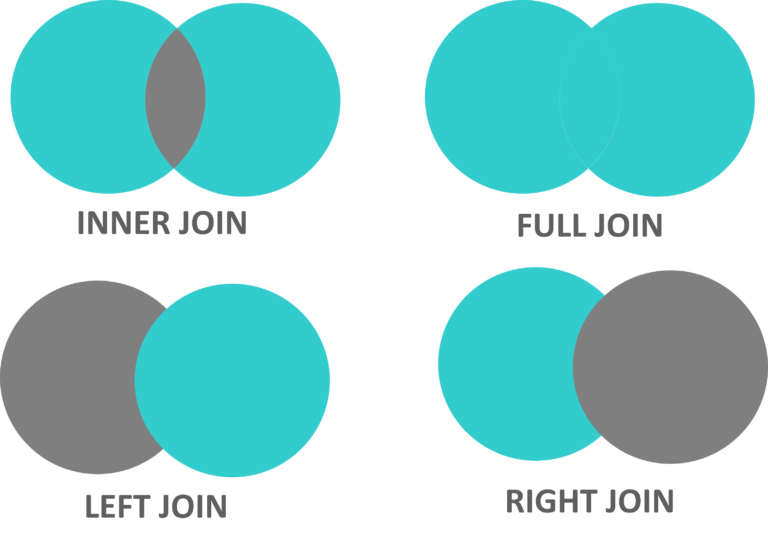
JOINS combine rows from multiple tables based on a related column (typically keys).
- INNER JOIN: only matching rows in both tables
- LEFT JOIN: all rows from left + matching rows from right
- RIGHT JOIN: all rows from right + matching rows from left
- FULL OUTER JOIN: all rows from both sides (⚠️ not directly supported in MySQL; use
UNIONpattern)
-- Generic JOIN templates

SELECT column_name(s)
FROM table1
INNER JOIN table2 ON table1.column_name = table2.column_name;

SELECT column_name(s)
FROM table1
LEFT JOIN table2 ON table1.column_name = table2.column_name;

SELECT column_name(s)
FROM table1
RIGHT JOIN table2 ON table1.column_name = table2.column_name;

-- NOTE: MySQL does not support FULL OUTER JOIN directly.
-- Use the UNION workaround shown in the practice block below.
Practice on Join
Students Table
-- Create the Departments Table

CREATE TABLE Departments (
    DeptID INT PRIMARY KEY,
    DeptName VARCHAR(50)
);

INSERT INTO Departments (DeptID, DeptName) VALUES
(100, 'HR'),
(200, 'Engineering'),
(500, 'Sales');


-- Create the Employees Table

CREATE TABLE Employees (
    EmployeeID INT PRIMARY KEY,
    EmployeeName VARCHAR(50),
    DeptID INT,
); -- FOREIGN KEY (DeptID) REFERENCES Departments(DeptID)

INSERT INTO Employees (EmployeeID, EmployeeName, DeptID) VALUES
(1, 'Alice', 100),
(2, 'Bob', 200),
(3, 'Carol', 100),
(4, 'Dave', 300);


SELECT * FROM Departments;
+--------+-------------+
| DeptID | DeptName    |
+--------+-------------+
|    100 | HR          |
|    200 | Engineering |
|    500 | Sales       |
+--------+-------------+

SELECT * FROM Employees;
+------------+--------------+--------+
| EmployeeID | EmployeeName | DeptID |
+------------+--------------+--------+
|          1 | Alice        |    100 |
|          2 | Bob          |    200 |
|          3 | Carol        |    100 |
|          4 | Dave         |    300 |
+------------+--------------+--------+
-- INNER JOIN

SELECT *
FROM Employees
INNER JOIN Departments ON Employees.DeptID = Departments.DeptID;

+------------+--------------+--------+--------+-------------+
| EmployeeID | EmployeeName | DeptID | DeptID | DeptName    |
+------------+--------------+--------+--------+-------------+
|          1 | Alice        |    100 |    100 | HR          |
|          2 | Bob          |    200 |    200 | Engineering |
|          3 | Carol        |    100 |    100 | HR          |
+------------+--------------+--------+--------+-------------+

SELECT Employees.EmployeeID, Departments.DeptName
FROM Employees
INNER JOIN Departments ON Employees.DeptID = Departments.DeptID;

+------------+-------------+
| EmployeeID | DeptName    |
+------------+-------------+
|          1 | HR          |
|          2 | Engineering |
|          3 | HR          |
+------------+-------------+

-- LEFT JOIN

SELECT *
FROM Employees
LEFT JOIN Departments ON Employees.DeptID = Departments.DeptID;

+------------+--------------+--------+--------+-------------+
| EmployeeID | EmployeeName | DeptID | DeptID | DeptName    |
+------------+--------------+--------+--------+-------------+
|          1 | Alice        |    100 |    100 | HR          |
|          2 | Bob          |    200 |    200 | Engineering |
|          3 | Carol        |    100 |    100 | HR          |
|          4 | Dave         |    300 |   NULL | NULL        |
+------------+--------------+--------+--------+-------------+

-- RIGHT JOIN

SELECT *
FROM Employees
RIGHT JOIN Departments ON Employees.DeptID = Departments.DeptID;

+------------+--------------+--------+--------+-------------+
| EmployeeID | EmployeeName | DeptID | DeptID | DeptName    |
+------------+--------------+--------+--------+-------------+
|          3 | Carol        |    100 |    100 | HR          |
|          1 | Alice        |    100 |    100 | HR          |
|          2 | Bob          |    200 |    200 | Engineering |
|       NULL | NULL         |   NULL |    500 | Sales       |
+------------+--------------+--------+--------+-------------+

-- FULL JOIN

SELECT *
FROM Employees
LEFT JOIN Departments ON Employees.DeptID = Departments.DeptID
UNION ALL
SELECT *
FROM Employees
RIGHT JOIN Departments ON Employees.DeptID = Departments.DeptID
WHERE Employees.DeptID IS NULL;

+------------+--------------+--------+--------+-------------+
| EmployeeID | EmployeeName | DeptID | DeptID | DeptName    |
+------------+--------------+--------+--------+-------------+
|          1 | Alice        |    100 |    100 | HR          |
|          2 | Bob          |    200 |    200 | Engineering |
|          3 | Carol        |    100 |    100 | HR          |
|          4 | Dave         |    300 |   NULL | NULL        |
|       NULL | NULL         |   NULL |    500 | Sales       |
+------------+--------------+--------+--------+-------------+
Data Control Language (DCL)
Data Control Language (DCL) is a subset of SQL used to control access to database objects such as tables, views, and stored procedures. DCL focuses on security, authorization, and permission management.
In MySQL, DCL is primarily implemented through the
GRANT and REVOKE commands, which assign or remove
privileges for users and roles.
Privileges can be applied at different levels:
*.* (global), database.*, or
database.table.
Create and Drop Users
In MySQL, users are identified by both a username and a host. This allows fine-grained control over where users can connect from.
CREATE USER 'username'@'host' IDENTIFIED BY 'password';
- username: Account name
- host: Allowed connection source (
localhost,%, IP) - password: User authentication secret
-- Local-only user
CREATE USER 'john'@'localhost' IDENTIFIED BY 'secure_password';
-- User allowed from any host
CREATE USER 'john'@'%' IDENTIFIED BY 'secure_password';
MySQL stores user account information internally. Administrators can inspect user metadata using:
SELECT User, Host, authentication_string
FROM mysql.user;
-- Remove a user completely
DROP USER 'john'@'localhost';
GRANT: Assigning Privileges
The GRANT command assigns permissions to users on specific
database objects.
GRANT privilege_name
ON object_name
TO 'username'@'host';
-- Grant SELECT on all tables in a database
GRANT SELECT ON employees.* TO 'john'@'localhost';
-- Grant multiple privileges on a table
GRANT SELECT, INSERT, UPDATE
ON employees
TO 'john'@'localhost';
-- Grant full privileges on a database
GRANT ALL PRIVILEGES ON employees.* TO 'john'@'localhost';
-- Grant full privileges on all databases (admin-level)
GRANT ALL PRIVILEGES ON *.* TO 'john'@'localhost';
-- Allow user to re-grant privileges to others
GRANT SELECT
ON employees.*
TO 'john'@'localhost'
WITH GRANT OPTION;
Inspecting Privileges
To see what privileges a user currently has:
SHOW GRANTS FOR 'john'@'localhost';
REVOKE: Removing Privileges
The REVOKE command removes previously granted privileges.
REVOKE privilege_name
ON object_name
FROM 'username'@'host';
-- Remove INSERT privilege
REVOKE INSERT ON employees.* FROM 'john'@'localhost';
-- Remove multiple privileges
REVOKE SELECT, INSERT, UPDATE
ON employees
FROM 'john'@'localhost';
-- Remove all privileges on a database
REVOKE ALL PRIVILEGES
ON employees.*
FROM 'john'@'localhost';
Important Notes
- Only administrative users (e.g.,
root) can manage DCL.- Grant the minimum privileges necessary (principle of least privilege).
- Be extremely cautious with
GRANT ALL ON *.*.- In MySQL 8+, privileges take effect immediately (no
FLUSHneeded).
Transaction Control Language (TCL)
Transaction Control Language (TCL) commands are used to manage transactions in a database system. A transaction is a sequence of database operations that are treated as a single logical unit of work.
TCL ensures that database changes are applied in a safe, consistent, and recoverable way: either all changes succeed or none of them take effect.
COMMIT
The COMMIT command permanently saves all changes made during
the current transaction.
COMMIT;
START TRANSACTION;

INSERT INTO employees (name, department, salary)
VALUES ('John Doe', 'IT', 60000);

UPDATE employees
SET salary = salary + 5000
WHERE name = 'Jane Smith';

COMMIT;
START TRANSACTIONbegins a new transaction.- All changes remain temporary until
COMMIT. - After
COMMIT, changes become permanent and visible to others.
ROLLBACK
The ROLLBACK command undoes all changes made during
the current transaction.
ROLLBACK;
START TRANSACTION;

INSERT INTO employees (name, department, salary)
VALUES ('John Doe', 'IT', 60000);

UPDATE employees
SET salary = salary + 5000
WHERE name = 'Jane Smith';

-- An error occurs
ROLLBACK;
After ROLLBACK, the database state is exactly the same
as before the transaction began.
SAVEPOINT
A SAVEPOINT creates a named checkpoint inside a transaction.
You can roll back to a savepoint without canceling the entire transaction.
SAVEPOINT savepoint_name;
START TRANSACTION;

INSERT INTO employees (name, department, salary)
VALUES ('John Doe', 'IT', 60000);
SAVEPOINT sp1;

INSERT INTO employees (name, department, salary)
VALUES ('Jane Smith', 'HR', 70000);
SAVEPOINT sp2;

UPDATE employees
SET salary = 75000
WHERE name = 'Jane Smith';

ROLLBACK TO sp2;
COMMIT;
sp1andsp2mark intermediate states.ROLLBACK TO sp2undoes only the last update.- Earlier operations remain intact.
RELEASE SAVEPOINT
The RELEASE SAVEPOINT command removes a savepoint.
After release, you can no longer roll back to that savepoint.
RELEASE SAVEPOINT savepoint_name;
START TRANSACTION;

UPDATE accounts SET balance = balance - 50 WHERE id = 1;
SAVEPOINT sp1;

UPDATE accounts SET balance = balance - 50 WHERE id = 1;
RELEASE SAVEPOINT sp1;

COMMIT;
SET TRANSACTION
SET TRANSACTION configures transaction behavior, including
read/write mode and isolation level.
SET TRANSACTION
[READ ONLY | READ WRITE]
ISOLATION LEVEL
{READ UNCOMMITTED | READ COMMITTED | REPEATABLE READ | SERIALIZABLE};
SET TRANSACTION ISOLATION LEVEL SERIALIZABLE;
START TRANSACTION;

SELECT * FROM employees
WHERE department = 'IT';

COMMIT;
ACID Properties of Transactions
- Atomicity: All operations succeed or none do.
- Consistency: Database moves between valid states.
- Isolation: Concurrent transactions do not interfere.
- Durability: Committed changes survive failures.
Transaction Isolation Levels
- READ UNCOMMITTED — Allows dirty reads (rarely used).
- READ COMMITTED — Prevents dirty reads.
- REPEATABLE READ — Default in MySQL; prevents non-repeatable reads.
- SERIALIZABLE — Full isolation; strongest consistency guarantees.
Important Notes
- Use transactions for multi-step updates.
- MySQL transactions require
InnoDBtables.- DDL statements (e.g.,
CREATE TABLE) implicitly commit.- Choose isolation levels carefully for performance vs consistency.
Most practical SQL work can be expressed using a small set of patterns:
- Filter with
WHERE(predicates, NULL handling). - Project columns with
SELECT(expressions, aliases). - Aggregate with
GROUP BY+HAVING. - Sort & limit with
ORDER BY+LIMIT. - Join tables on keys (
INNER/LEFT/RIGHTjoins).
Conceptually, you can think of a SELECT query as a pipeline:
FROM → WHERE → GROUP BY → HAVING → SELECT → ORDER BY → LIMIT.
We will reuse these tables in exercises:
- sid PK
- name
- major
- sid FK
- cid FK
- grade
- cid PK
- title
- credits
Write a query to list all rows and columns from Student.
Show hint
Use SELECT *.
Show answer
SELECT * FROM Student;
List student names and majors, and rename the columns as student_name and program.
Show hint
Use AS for aliases.
Show answer
SELECT name AS student_name, major AS program
FROM Student;
List all CS majors (major = 'CS').
Show hint
Add a WHERE clause.
Show answer
SELECT * FROM Student
WHERE major = 'CS';
Return the distinct majors that are either 'CS', 'DS', or 'SE'.
Show hint
Use DISTINCT and IN (...).
Show answer
SELECT DISTINCT major
FROM Student
WHERE major IN ('CS','DS','SE');
Find students whose name starts with 'A'.
Show hint
Use LIKE 'A%'.
Show answer
SELECT * FROM Student
WHERE name LIKE 'A%';
List the 5 courses with the largest number of credits (ties allowed).
Show hint
Sort descending, then limit.
Show answer
SELECT * FROM Course
ORDER BY credits DESC
LIMIT 5;
List student name, course title, and grade for all enrollments.
Show hint
Join Student↔Enroll and Enroll↔Course on sid/cid.
Show answer
SELECT s.name, c.title, e.grade
FROM Enroll e
JOIN Student s ON e.sid = s.sid
JOIN Course  c ON e.cid = c.cid;
List all students and their enrollments (include students with no enrollments).
Show hint
Start from Student and LEFT JOIN Enroll.
Show answer
SELECT s.sid, s.name, e.cid, e.grade
FROM Student s
LEFT JOIN Enroll e ON e.sid = s.sid;
Find course IDs with at least 10 enrolled students.
Show hint
Group enrollments by cid; filter groups using HAVING.
Show answer
SELECT cid
FROM Enroll
GROUP BY cid
HAVING COUNT(*) >= 10;
Return the names of students who are not enrolled in any course.
Show hint
LEFT JOIN and filter where the joined key is NULL, or use NOT EXISTS.
Show answer
SELECT s.name
FROM Student s
LEFT JOIN Enroll e ON e.sid = s.sid
WHERE e.sid IS NULL;
For each student, list the number of courses they are enrolled in (including 0).
Show hint
LEFT JOIN + GROUP BY is usually simplest; correlated subquery also works.
Show answer
SELECT s.sid, s.name, COUNT(e.cid) AS num_courses
FROM Student s
LEFT JOIN Enroll e ON e.sid = s.sid
GROUP BY s.sid, s.name;
Suppose some Enroll.grade values are NULL (not yet assigned).
Write a query to list all enrollments that do not have a grade yet.
Show hint
Use IS NULL, not = NULL.
Show answer
SELECT * FROM Enroll
WHERE grade IS NULL;
Dataset Setup RUN FIRST
We create a small table shop(article, dealer, price) with a composite primary key
(article, dealer).
CREATE TABLE shop (
  article INT UNSIGNED  DEFAULT 0    NOT NULL,
  dealer  CHAR(20)      DEFAULT ''   NOT NULL,
  price   DECIMAL(16,2) DEFAULT 0.00 NOT NULL,
  PRIMARY KEY(article, dealer)
);

INSERT INTO shop VALUES
  (1,'A',3.45),(1,'B',3.99),(2,'A',10.99),(3,'B',1.45),
  (3,'C',1.69),(3,'D',1.25),(4,'D',19.95);

SELECT * FROM shop ORDER BY article;
+---------+--------+-------+
| article | dealer | price |
+---------+--------+-------+
|       1 | A      |  3.45 |
|       1 | B      |  3.99 |
|       2 | A      | 10.99 |
|       3 | B      |  1.45 |
|       3 | C      |  1.69 |
|       3 | D      |  1.25 |
|       4 | D      | 19.95 |
+---------+--------+-------+
MAX() aggregate •
② correlated subquery •
③ ORDER BY ... LIMIT •
④ (Up-to-date) window functions
1. What is the highest item number?
Show answer
SELECT MAX(article) AS article
FROM shop;

+---------+
| article |
+---------+
|       4 |
+---------+
2. Find the number, dealer, and price of the most expensive article.
Show answer
-- (A) Subquery with MAX(price)
SELECT article, dealer, price
FROM shop
WHERE price = (SELECT MAX(price) FROM shop);

+---------+--------+-------+
| article | dealer | price |
+---------+--------+-------+
|       4 | D      | 19.95 |
+---------+--------+-------+
-- (B) Anti-join (find rows that have no strictly higher price)
SELECT s1.article, s1.dealer, s1.price
FROM shop s1
LEFT JOIN shop s2
  ON s1.price < s2.price
WHERE s2.article IS NULL;
-- (C) ORDER BY + LIMIT (fast + simple)
SELECT article, dealer, price
FROM shop
ORDER BY price DESC
LIMIT 1;
-- (D) MySQL 8+ window function (handles ties cleanly if you want)
SELECT article, dealer, price
FROM (
  SELECT s.*,
         DENSE_RANK() OVER (ORDER BY price DESC) AS rnk
  FROM shop s
) t
WHERE rnk = 1;
3. Find the highest price per article.
Show answer
SELECT article, MAX(price) AS price
FROM shop
GROUP BY article
ORDER BY article;

+---------+-------+
| article | price |
+---------+-------+
|       1 |  3.99 |
|       2 | 10.99 |
|       3 |  1.69 |
|       4 | 19.95 |
+---------+-------+
4. For each article, find the dealer(s) with the most expensive price.
Show answer
-- (A) Correlated subquery (classic)
SELECT article, dealer, price
FROM shop s1
WHERE price = (
  SELECT MAX(s2.price)
  FROM shop s2
  WHERE s1.article = s2.article
)
ORDER BY article;

+---------+--------+-------+
| article | dealer | price |
+---------+--------+-------+
|       1 | B      |  3.99 |
|       2 | A      | 10.99 |
|       3 | C      |  1.69 |
|       4 | D      | 19.95 |
+---------+--------+-------+
-- (B) MySQL 8+ window function (great for ties)
SELECT article, dealer, price
FROM (
  SELECT s.*,
         DENSE_RANK() OVER (PARTITION BY article ORDER BY price DESC) AS rnk
  FROM shop s
) t
WHERE rnk = 1
ORDER BY article;
5. Using user-defined variables to find the articles with the highest and lowest price.
Show answer
SELECT @min_price := MIN(price),
       @max_price := MAX(price)
FROM shop;

SELECT *
FROM shop
WHERE price = @min_price OR price = @max_price;

+---------+--------+-------+
| article | dealer | price |
+---------+--------+-------+
|       3 | D      |  1.25 |
|       4 | D      | 19.95 |
+---------+--------+-------+
-- (Up-to-date) MySQL 8+ window function alternative
SELECT article, dealer, price
FROM (
  SELECT s.*,
         MIN(price) OVER () AS min_price,
         MAX(price) OVER () AS max_price
  FROM shop s
) t
WHERE price = min_price OR price = max_price;
Scenario PERMISSIONS + TRANSACTION
You create an orders table, grant privileges to a user, revoke one privilege,
then run a transaction with a savepoint.
CREATE TABLE orders (
  order_id    INT UNSIGNED     DEFAULT 0    NOT NULL,
  customer_id INT UNSIGNED     DEFAULT 0    NOT NULL,
  amount      DECIMAL(16,2)    DEFAULT 0.00 NOT NULL,
  PRIMARY KEY(order_id)
);

INSERT INTO orders VALUES
  (1, 101, 200.50),
  (2, 102, 150.75),
  (3, 103, 300.40);

SELECT * FROM orders;
+----------+-------------+--------+
| order_id | customer_id | amount |
+----------+-------------+--------+
|        1 |         101 | 200.50 |
|        2 |         102 | 150.75 |
|        3 |         103 | 300.40 |
+----------+-------------+--------+

CREATE USER 'john'@'localhost' IDENTIFIED BY 'password';

-- Correct MySQL syntax: GRANT ... ON db.table ...
-- (If you omit db, it may fail depending on current database.)
GRANT SELECT, UPDATE ON your_db_name.orders TO 'john'@'localhost';

-- In modern MySQL, FLUSH PRIVILEGES is NOT needed after GRANT/REVOKE.
-- (It is mainly for when you manually edit privilege tables.)
-- FLUSH PRIVILEGES;

-- SHOW GRANTS FOR 'john'@'localhost';

-- Correct quoting for host is with single quotes
REVOKE UPDATE ON your_db_name.orders FROM 'john'@'localhost';

-- SHOW GRANTS FOR 'john'@'localhost';

START TRANSACTION;
UPDATE orders SET amount = amount + 10 WHERE order_id = 1;
SAVEPOINT sp1;
UPDATE orders SET amount = amount + 20 WHERE order_id = 2;
ROLLBACK TO sp1;
COMMIT;
1. What permissions does user 'john' have on orders after GRANT and REVOKE?
Show answer
SHOW GRANTS FOR 'john'@'localhost';

-- Result: john has SELECT on your_db_name.orders
-- UPDATE was revoked, so it is no longer present.
2. What will be the amounts for order_id = 1 and order_id = 2 after the transaction?
Show answer
-- order_id = 1:
-- 200.50 + 10 = 210.50 (committed)

-- order_id = 2:
-- The +20 update happened after savepoint sp1 and was rolled back.
-- So it remains 150.75.
3. How do you set a transaction to be READ ONLY?
Show answer
SET TRANSACTION READ ONLY;
START TRANSACTION;
-- queries...
COMMIT;
4. How do you release a savepoint?
Show answer
RELEASE SAVEPOINT sp1;
5. How do you roll back a transaction to the beginning?
Show answer
ROLLBACK;
Please follow the examples on Examples of Common Queries.
MySQL WorkBench
MySQL Workbench
MySQL Workbench is a unified, visual tool for database architects, developers, and DBAs. It combines data modeling, SQL development, and administration in one GUI, so you can design schemas, run queries, and manage users/servers without relying only on command-line tools. It runs on Windows, macOS, and Linux. (Oracle’s release notes show ongoing 8.0.x releases, e.g., 8.0.44 as a GA release dated 2025-10-22.)
-
SQL Development
- Create and execute SQL queries in an integrated editor.
- Syntax highlighting + auto-completion to reduce mistakes.
- Browse and edit table data visually (insert/update/delete in grid view).
-
Data Modeling and Design
- Visual tools for creating Entity-Relationship Diagrams (ERD / EER).
- Forward engineering (model → database) and reverse engineering (database → model).
- Model/database synchronization to compare and apply schema changes more safely.
-
Database Administration
- User, privilege, and (in many setups) role management.
- Performance monitoring/diagnostics (useful when teaching “why is this query slow?”).
- Common maintenance tasks (configuration views, server status dashboards, etc.).
-
Migration Tools
- Migration wizard to help move schemas/data from other databases into MySQL (capabilities vary by source DB and drivers).
-
Database Design Validation
- Basic checks for modeling/syntax issues before implementing a schema.
-
Schema and Server Monitoring
- Track connections, query activity, and other high-level health metrics.
-
User and Privilege Management
- Create/modify/delete accounts and adjust permissions through a GUI.
- Good companion to your DCL section (
GRANT/REVOKE), because students can “see” the outcome.
-
Database Backup and Recovery
- Export/import features for moving data or making snapshots (exact options depend on OS and installed components).
- In practice, DBAs often pair Workbench with command-line tools (e.g.,
mysqldump/mysqlor MySQL Shell) for automation.
Quick start (beginner-friendly)
- Connect: Home → “MySQL Connections” → new connection → set Host/Port/User + (optional) SSL/SSH tunnel.
- Run queries: Open SQL Editor → write SQL → execute → inspect results in the grid.
- Modeling: File → New Model → add tables/relations → Forward Engineer to generate DDL.
- Reverse engineer: Database → Reverse Engineer → select schema → generate EER diagram.
MySQL Workbench Tutorial
MySQL Workbench Tutorial
MySQL Workbench Tutorial
MySQL Full Course
MySQL with Python
Python is commonly used to build database-backed applications, and MySQL is one of the most widely used relational databases. To run the examples below, make sure you have a MySQL server installed (local or remote), and a Python environment ready.
SELECT, INSERT, UPDATE, …) and send it to MySQL using a Python driver.
connect() makes a session; a cursor runs SQL; you fetch* results; you commit() writes.
1) Install a MySQL Driver
Python needs a MySQL driver to talk to the MySQL server. A common choice is
MySQL Connector/Python (mysql-connector-python), maintained by Oracle/MySQL.
(As of Oct 2025, the PyPI release is in the 9.x series.)
pip install mysql-connector-python
Or:
python -m pip install mysql-connector-python
Up-to-date note
If you run into compatibility issues, upgrade pip first and ensure you’re using a supported Python version.
Also note that mysql-connector-python is actively updated on PyPI.
2) Test the Installation
To test if the installation was successful, create a Python script and run it:
import mysql.connector
print("mysql.connector imported successfully!")
Common error: ModuleNotFoundError: No module named 'mysql.connector'; 'mysql' is not a package
- Make sure you installed the package into the same Python environment you run.
- Check you don’t have a local file named
mysql.pythat shadows the package.
3) Create a Connection
Start by creating a connection using a MySQL username and password. (In real projects, avoid hard-coding passwords—use environment variables or a secrets manager.)
MySQL user creation (SQL)
CREATE USER 'yourusername'@'localhost' IDENTIFIED BY 'yourpassword';
import mysql.connector

mydb = mysql.connector.connect(
  host="localhost",
  user="yourusername",
  password="yourpassword"
)

print(mydb)
Tip: verify connection + server version
cur = mydb.cursor()
cur.execute("SELECT VERSION();")
print(cur.fetchone())
cur.close()
4) Cursor Basics
A cursor executes SQL commands and lets you fetch results. Think of it as the “handle” you use to send SQL to MySQL and read returned rows.
Common cursor methods| Method | Description |
|---|---|
execute(query, params=None) | Run one SQL statement. |
executemany(query, seq_of_params) | Run the same SQL statement multiple times. |
fetchone() | Get the next row. |
fetchall() | Get all remaining rows. |
close() | Close the cursor. |
lastrowid | ID of the last inserted row (when available). |
Buffered cursor (helps avoid “Unread result found”)
If you execute a query that returns rows, you should fetch them before running a new statement on the same cursor. A common practical option is to use a buffered cursor for small/medium result sets:
cur = mydb.cursor(buffered=True)
5) Create / Select a Database
import mysql.connector

mydb = mysql.connector.connect(
  host="localhost",
  user="yourusername",
  password="yourpassword"
)

mycursor = mydb.cursor()
mycursor.execute("CREATE DATABASE mydatabase")
If you encounter:1044 (42000): Access denied for user 'yourusername'@'localhost' to database 'mydatabase'
- Your user likely lacks
CREATEprivileges on databases.- Ask an admin / root user to grant the minimum needed privileges.
List databases:
mycursor.execute("SHOW DATABASES")
for x in mycursor:
  print(x)
Connect directly to a database:
mydb = mysql.connector.connect(
  host="localhost",
  user="yourusername",
  password="yourpassword",
  database="mydatabase"
)
6) Create Tables (with PRIMARY KEY)
mycursor = mydb.cursor()
mycursor.execute("CREATE TABLE customers (name VARCHAR(255), address VARCHAR(255))")
Show tables:
mycursor.execute("SHOW TABLES")
for x in mycursor:
  print(x)
When creating a table, you usually want a unique key for each row (a PRIMARY KEY).
In MySQL, AUTO_INCREMENT is commonly used for an integer primary key.
mycursor.execute("""
CREATE TABLE customers (
  id INT AUTO_INCREMENT PRIMARY KEY,
  name VARCHAR(255),
  address VARCHAR(255)
)
""")
Create a primary key column on an existing table:
mycursor.execute("ALTER TABLE customers ADD COLUMN id INT AUTO_INCREMENT PRIMARY KEY")
7) Insert Data
# skip the steps to define mydb and mycursor

sql = "INSERT INTO customers (name, address) VALUES (%s, %s)"
val = ("John", "Highway 21")
mycursor.execute(sql, val)

mydb.commit()
print(mycursor.rowcount, "record inserted.")
About the “Unread result found” error
This usually happens when a previous statement produced a result set that wasn’t fully fetched, and then you executed another statement using the same connection/cursor.
# Example that can trigger the issue if results are not consumed:

mycursor.execute("SHOW TABLES")  # returns rows

sql = "INSERT INTO customers (name, address) VALUES (%s, %s)"
val = ("John", "Highway 21")
mycursor.execute(sql, val)       # can fail if SHOW TABLES results not consumed
mydb.commit()
# One simple fix: consume results before running another statement mycursor.execute("SHOW TABLES") results = mycursor.fetchall() for row in results: print(row) sql = "INSERT INTO customers (name, address) VALUES (%s, %s)" val = ("John", "Highway 21") mycursor.execute(sql, val) mydb.commit()Alternative fixes
- Use
cursor(buffered=True)for small result sets.- Use separate cursors for separate tasks (read cursor vs write cursor).
Insert multiple rows
# skip the steps to define mydb and mycursor

sql = "INSERT INTO customers (name, address) VALUES (%s, %s)"
val = [
  ('Peter', 'Lowstreet 4'),
  ('Amy', 'Apple st 652'),
  ('Hannah', 'Mountain 21'),
  ('Michael', 'Valley 345'),
  ('Sandy', 'Ocean blvd 2'),
  ('Betty', 'Green Grass 1'),
  ('Richard', 'Sky st 331'),
  ('Susan', 'One way 98'),
  ('Vicky', 'Yellow Garden 2'),
  ('Ben', 'Park Lane 38'),
  ('William', 'Central st 954'),
  ('Chuck', 'Main Road 989'),
  ('Viola', 'Sideway 1633')
]

mycursor.executemany(sql, val)
mydb.commit()

print(mycursor.rowcount, "was inserted.")
Get the inserted row id:
sql = "INSERT INTO customers (name, address) VALUES (%s, %s)"
val = ("Michelle", "Blue Village")
mycursor.execute(sql, val)
mydb.commit()

print("1 record inserted, ID:", mycursor.lastrowid)
8) Select Data
Select all records:
mycursor.execute("SELECT * FROM customers")
myresult = mycursor.fetchall()
for x in myresult:
  print(x)
Select specific columns:
mycursor.execute("SELECT name, address FROM customers")
myresult = mycursor.fetchall()
for x in myresult:
  print(x)
Fetch only one row:
mycursor.execute("SELECT * FROM customers")
myresult = mycursor.fetchone()
print(myresult)
Combine with WHERE / ORDER BY / LIMIT
sql = "SELECT * FROM customers WHERE address = %s"
mycursor.execute(sql, ("Park Lane 38",))

sql = "SELECT * FROM customers ORDER BY name"
mycursor.execute(sql)

mycursor.execute("SELECT * FROM customers LIMIT 5")
Security note: always parameterize inputs
Don’t build SQL by string concatenation with user input (SQL injection risk).
Use placeholders (%s) + parameters as shown above.
9) UPDATE / DELETE / DROP
sql = "DELETE FROM customers WHERE address = %s"
mycursor.execute(sql, ("Mountain 21",))
mydb.commit()
print(mycursor.rowcount, "record(s) deleted")
UPDATE
sql = "UPDATE customers SET address = %s WHERE address = %s"
mycursor.execute(sql, ("Canyon 123", "Valley 345"))
mydb.commit()
print(mycursor.rowcount, "record(s) affected")
DROP TABLE
mycursor.execute("DROP TABLE customers")
mycursor.execute("DROP TABLE IF EXISTS customers")
10) JOIN Tables
Make sure users and products tables exist and are populated.
sql = """
SELECT
  users.name AS user,
  products.name AS favorite
FROM users
INNER JOIN products ON users.fav = products.id
"""

# or LEFT JOIN / RIGHT JOIN
# sql = """
# SELECT users.name AS user, products.name AS favorite
# FROM users
# LEFT JOIN products ON users.fav = products.id
# """

mycursor.execute(sql)
myresult = mycursor.fetchall()
for x in myresult:
  print(x)
SQL With Python
MySQL with Java
Java connects to MySQL through JDBC (Java Database Connectivity). In practice, you add the
MySQL Connector/J driver to your project, open a connection using a JDBC URL, and then run
SQL with PreparedStatement (recommended) to avoid SQL injection and handle parameters safely.
com.mysql.cj.jdbc.Driver (you usually don’t need to call Class.forName anymore).
? and bind parameters.
1) Add the JDBC driver (Maven / Gradle)
Maven (add inside <dependencies>):
<dependency>
  <groupId>com.mysql</groupId>
  <artifactId>mysql-connector-j</artifactId>
  <!-- Use the latest stable version from Maven Central -->
</dependency>
Gradle:
dependencies {
  implementation("com.mysql:mysql-connector-j")
  // Use the latest stable version from Maven Central
}
2) Connection settings
root) for apps.
Common connection pitfalls
- Timezone errors: If you see timezone-related exceptions, add
serverTimezone=UTC(or your preferred timezone) to the JDBC URL.- SSL warnings: Modern MySQL versions may prefer SSL. Use
useSSL=true(or configure properly).- Public Key Retrieval: For some setups you may need
allowPublicKeyRetrieval=true(dev only; understand the security implications).
3) Minimal “test connection” example
import java.sql.Connection;
import java.sql.DriverManager;
import java.sql.SQLException;

public class DbConnectTest {
  public static void main(String[] args) {
    String url = "jdbc:mysql://localhost:3306/StudentsInfo?useSSL=true&serverTimezone=UTC";
    String user = "yourusername";
    String password = "yourpassword";

    try (Connection conn = DriverManager.getConnection(url, user, password)) {
      System.out.println("✅ Connected to MySQL successfully!");
    } catch (SQLException e) {
      System.out.println("❌ Connection failed:");
      e.printStackTrace();
    }
  }
}
4) Query with PreparedStatement (recommended)
import java.sql.*;

public class SelectExample {
  public static void main(String[] args) throws Exception {
    String url = "jdbc:mysql://localhost:3306/StudentsInfo?useSSL=true&serverTimezone=UTC";
    String user = "yourusername";
    String password = "yourpassword";

    String sql = "SELECT StudentID, StudentName, Country, Fees FROM Infostudents WHERE Country = ? AND Fees >= ?";

    try (Connection conn = DriverManager.getConnection(url, user, password);
         PreparedStatement ps = conn.prepareStatement(sql)) {

      ps.setString(1, "India");
      ps.setInt(2, 30000);

      try (ResultSet rs = ps.executeQuery()) {
        while (rs.next()) {
          int id = rs.getInt("StudentID");
          String name = rs.getString("StudentName");
          String country = rs.getString("Country");
          int fees = rs.getInt("Fees");
          System.out.printf("%d | %s | %s | %d%n", id, name, country, fees);
        }
      }
    }
  }
}
5) Insert / Update / Delete (with transactions)
import java.sql.*;

public class TransactionExample {
  public static void main(String[] args) throws Exception {
    String url = "jdbc:mysql://localhost:3306/StudentsInfo?useSSL=true&serverTimezone=UTC";
    String user = "yourusername";
    String password = "yourpassword";

    String insertSql = "INSERT INTO Infostudents (StudentID, StudentName, ParentName, Address, City, PostalCode, Country, Fees) " +
                       "VALUES (?, ?, ?, ?, ?, ?, ?, ?)";
    String updateSql = "UPDATE Infostudents SET Fees = Fees + ? WHERE StudentID = ?";
    String deleteSql = "DELETE FROM Infostudents WHERE StudentID = ?";

    try (Connection conn = DriverManager.getConnection(url, user, password)) {
      conn.setAutoCommit(false); // start transaction

      try (PreparedStatement ins = conn.prepareStatement(insertSql);
           PreparedStatement upd = conn.prepareStatement(updateSql);
           PreparedStatement del = conn.prepareStatement(deleteSql)) {

        // INSERT
        ins.setInt(1, 6);
        ins.setString(2, "Sanjana");
        ins.setString(3, "Jagannath");
        ins.setString(4, "Banjara Hills");
        ins.setString(5, "Hyderabad");
        ins.setString(6, "500046");
        ins.setString(7, "India");
        ins.setInt(8, 32000);
        ins.executeUpdate();

        // UPDATE
        upd.setInt(1, 1000);
        upd.setInt(2, 6);
        upd.executeUpdate();

        // DELETE (example)
        del.setInt(1, 7);
        del.executeUpdate();

        conn.commit();
        System.out.println("✅ Transaction committed.");
      } catch (SQLException ex) {
        conn.rollback();
        System.out.println("❌ Transaction rolled back.");
        throw ex;
      }
    }
  }
}
- Always use
PreparedStatementfor user inputs (SQL injection defense). - Use
try-with-resourcesto auto-closeConnection,Statement, andResultSet. - Keep DB users least-privilege (only the permissions you need).
- For real apps, consider a connection pool (e.g., HikariCP) instead of opening a new connection each time.
Java JDBC tutorial
Summary
- Explain SQL as a declarative language (“what” not “how”), and recognize the four families: DDL/DML/DCL/TCL.
- Connect to MySQL Server via CLI or Workbench and know the core connection parameters (host, port, user, password).
- DDL: create/drop databases and tables; add/modify columns; use constraints (PK/FK/UNIQUE/NOT NULL/CHECK/DEFAULT) and indexes.
- DML: insert/update/delete/select; filter with
WHERE; group withGROUP BY; filter groups withHAVING; sort/limit results. - JOINs: write
INNER/LEFT/RIGHTjoins; understand the MySQL workaround forFULL OUTER JOINusingUNION. - DCL: create users; grant/revoke privileges; inspect permissions with
SHOW GRANTS. - TCL: use
START TRANSACTION,COMMIT,ROLLBACK,SAVEPOINT; understand ACID at a high level. - Security awareness: understand why
LOAD DATA LOCAL INFILEis powerful but risky, and enable it only when needed.